
Latest version · 0.6.2

Download VLTone

VLTONE 0.6.2 adds ARA 2 support for compatible VST3 editors. This release also introduces spectral editing and audio restoration, the Mutation instrument, VLT 76 compression, Piano Roll vibrato, and additional instrument outputs. VLT 1073, editor workflows, and downloadable devices have been updated, alongside further audio-engine and interface optimization.

November 5, 2026

Before launching on macOS

This build is not yet notarized by Apple. Download it only from the official site, move the app to Applications, then run this command in Terminal:

sudo xattr -rd com.apple.quarantine "/Applications/VLTONE.app"
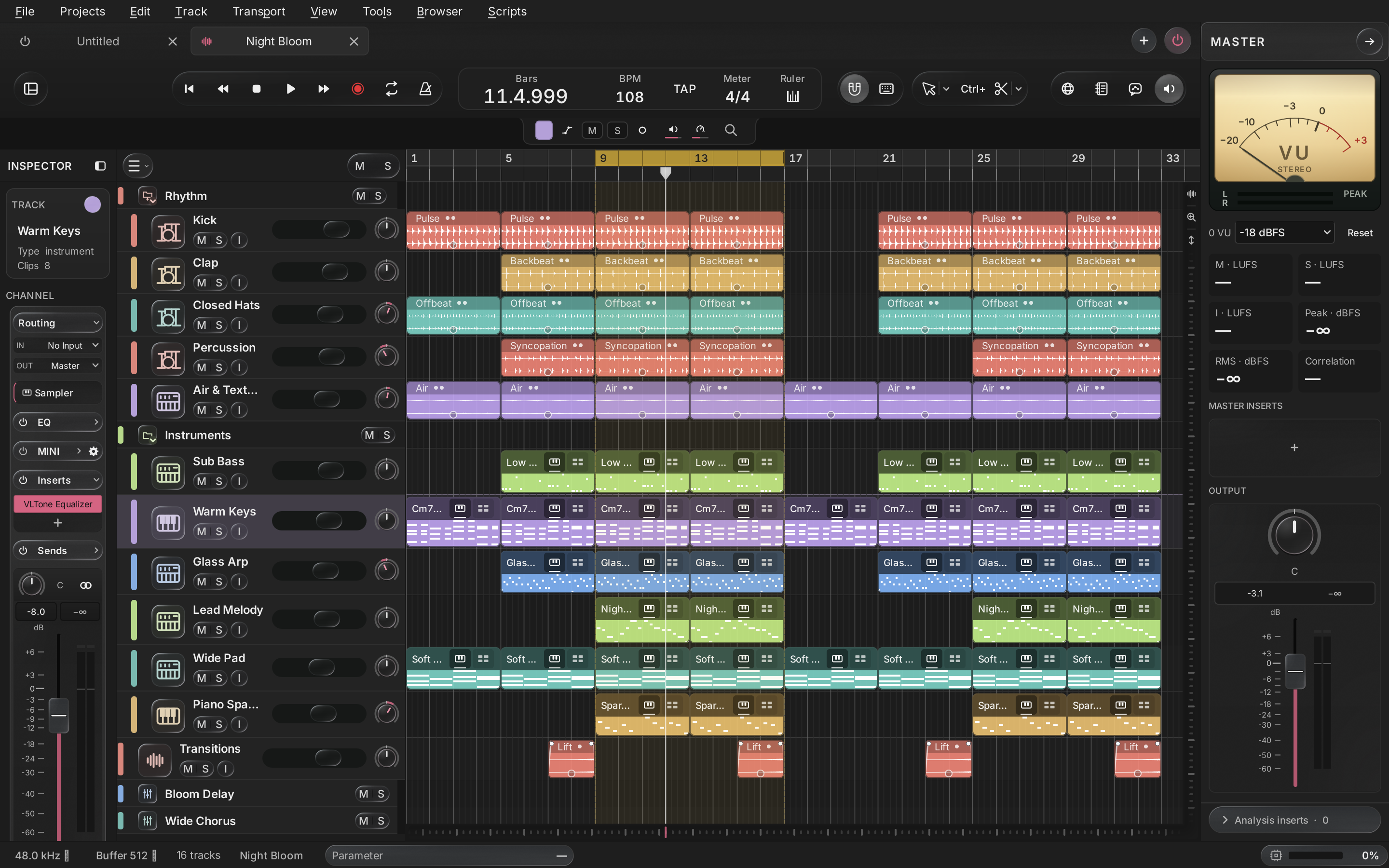
Night Bloom in VLTone: drums, bass, keys, arpeggios and melody
VLTone · Windows · macOS

New in VLTone 0.6.2

New in 0.6.2

ARA 2 support

Compatible VST3 editors can access track audio clips through ARA. The editor is pinned before the regular effects chain.

Read moreShow less: ARA 2 support
  • ARA supports mono and stereo tracks in local projects; ordinary VST3 loading remains available.
  • Corrections are stored with the project. Bypass restores the original audio, and committing creates a separate processed version.
  • This is an early integration: compatibility depends on the plugin. RX 11 has not passed playback validation, and the complete edit, save, and export workflow with commercial editors still needs further qualification.
Spectral editor: time-frequency selection, gain, and preview controls.
New in 0.6.2

Spectral editor

Edit specific parts of a sound in time and frequency: select a region on the spectrogram and audition the result before applying it.

Read moreShow less: Spectral editor
  • Rectangle, brush, and lasso selection, with additive and subtractive regions.
  • Gain, erase, and fades with feathered selection boundaries.
  • Audition the selected signal or remainder, compare A/B, and undo changes.
Spectral editor: time-frequency selection, gain, and preview controls.
New in 0.6.2

Audio restoration

Restoration tools are available inside the spectral editor: remove clicks, reduce noise, and attenuate reverberation.

Read moreShow less: Audio restoration
  • De-click and a dedicated mouth-click mode.
  • Noise-profile learning and adjustable voice protection.
  • De-reverb, adjustable processing strength, and preview before applying.
Noise reduction: noise profile, attenuation, smoothing, and voice protection.
New in 0.6.2

Mutation: new timbres from a sample

Load a short sound and progressively transform its spectral structure. Play the instrument over MIDI while the next generation is being prepared.

Read moreShow less: Mutation: new timbres from a sample
  • Time, speed, and mutation-strength controls, pitch preservation, and return to the original.
  • Sustain and one-shot modes with an Attack / Hold / Decay / Sustain / Release envelope.
  • Sound and state are stored in the project, with Undo / Redo and sample drops onto the microscope.
Mutation: sample transformation and a five-stage amplitude envelope.
New in 0.6.2

VLT 76

A new built-in FET compressor with a hardware-style panel and analog meter.

Read moreShow less: VLT 76
  • Input, Output, Attack, and Release controls, plus ratio buttons.
  • Meter modes for monitoring gain reduction and output level.
  • Device parameters and state are saved with the project.
VLT 76
VLT 76
New in 0.6.2

Vibrato directly on the note

A new Piano Roll tool lets you draw and adjust vibrato in the context of a MIDI phrase.

Read moreShow less: Vibrato directly on the note
  • Adjust the note region, vibrato depth, and rate.
  • Edit depth and rate envelopes using control points and a visible waveform.
  • Audition changes, save them in the project, and use Undo / Redo.
Vibrato directly on the note
New in 0.6.2

Separate instrument outputs

Route additional outputs from multi-output instruments to separate channels for independent mixing.

Read moreShow less: Separate instrument outputs
  • Outputs appear as child tracks and mixer channels.
  • Independent level, pan, and processing for individual instrument parts.
  • Routing settings are stored with the project.
Additional instrument outputs in the mixer: separate Snare Top and Kick channels.
New in 0.6.2

Downloadable devices and CL1

A new system supports optional device packs. CL1 is provided as a separate Windows x64 pack.

Read moreShow less: Downloadable devices and CL1
  • Package signature and integrity checks during installation and loading.
  • Projects retain the exact device version; missing packs preserve settings and offer a download.
  • CL1 offers optical compression, FIX / DUAL / MAN timing modes, and LINK groups.
Downloadable devices and CL1

More new features

  • ARA 2 support — Compatible VST3 editors can access track audio clips through ARA. The editor is pinned before the regular effects chain.
  • Spectral editor — Edit specific parts of a sound in time and frequency: select a region on the spectrogram and audition the result before applying it.
  • Audio restoration — Restoration tools are available inside the spectral editor: remove clicks, reduce noise, and attenuate reverberation.
  • Mutation: new timbres from a sample — Load a short sound and progressively transform its spectral structure. Play the instrument over MIDI while the next generation is being prepared.
  • VLT 76 — A new built-in FET compressor with a hardware-style panel and analog meter.
  • Vibrato directly on the note — A new Piano Roll tool lets you draw and adjust vibrato in the context of a MIDI phrase.
  • Separate instrument outputs — Route additional outputs from multi-output instruments to separate channels for independent mixing.
  • Downloadable devices and CL1 — A new system supports optional device packs. CL1 is provided as a separate Windows x64 pack.

Other changes

  • Editors can be docked in the workspace; window placement and editor switching have been refined.
  • Audio editors can work across clips on a track, allowing clip switching without opening another window.
  • Updated VLT 1073 visuals and controls; refined VLT 2A, Wavetable, the rack, and device panels.
  • Further internal subsystems now use Rust: MIDI, playback lookahead, modulation, waveform construction, pitch analysis, and vocal alignment.
  • Optimized timeline navigation and repainting, inline mixer EQ rendering, and audio task distribution across workers.
  • Strengthened macOS packaging checks and removed duplicate QML components.

Bug fixes

  • Fixed editor and background-task lifetime issues when closing or replacing a project.
  • Refined catalogue searches through filesystem aliases and temporary-data cleanup.
  • Fixed minimum control heights, hidden interface layers, and track-icon selection with Enter.
  • Improved ARA handling with older scanner caches: the selected plugin capabilities are refreshed before track insertion.
  • Spectral processing is safely discarded when switching clips, closing the editor, or replacing the project.

Choose a version

Open any version to download its installers and see the complete release notes.

v0.6.2Latest

VLTONE 0.6.2 adds ARA 2 support for compatible VST3 editors. This release also introduces spectral editing and audio restoration, the Mutation instrument, VLT 76 compression, Piano Roll vibrato, and additional instrument outputs. VLT 1073, editor workflows, and downloadable devices have been updated, alongside further audio-engine and interface optimization.

Nov 5, 2026
v0.6.1

VLTone 0.6.1 brings a small number of new features, with most of the work focused on optimization and stability. We introduced Rust into the audio engine and refined workload scheduling and memory use. This update also refreshes the VLT 2A interface, adds channel EQ, and improves audio editing, the mixer, and settings.

Nov 1, 2026
v0.6.0

Lua scripting, multiple project tabs, external AI integration, and new automation workflows. This update expands the ways you can adapt VLTONE to your workflow and improves editing, mixing, and built-in devices. VLTONE is completely free to use without registration. Continued development will rely on user support through donations, feedback, and bug reports. Thank you to everyone who uses VLTONE and helps it grow!

Oct 27, 2026
v0.5.1

VLTone 0.5.1 makes everyday music production more convenient. This update adds a MIDI Generator, parameter modulation in Rack, Morph and Flux multi-effects, and the VLT 1073 preamp/EQ. Sampler, Master, editors, settings and the built-in browser have also been refined, with further work on navigation smoothness, audio processing load, project saving and plugin behavior.

Oct 18, 2026
v0.5.0

VLTone 0.5.0 is a major update for building your own sound. Introducing Creator: assemble effects from nodes, write C++ or work with an AI assistant, then use the resulting mini-modules in your project. The update also brings Rack, Gain / Stereo Utility / Reverse, Slicer, a new audio editor, Warp with groove and alignment tools, timeline MIDI steps and arrangement organization tools. Audio processing, plugin workflows, recovery, collaboration and the interface have also been refined.

Oct 11, 2026
v0.3.1

VLTONE 0.3.1 adds drawn slide notes, sampler Slide / Legato and an updated Piano Roll. Replace samples directly from the note editor, generate chords in an empty clip, automate Master and bounce several tracks into one audio clip. The render window and AI chat have been redesigned, with fixes for MIDI clip trimming and sampler note transitions.

Sep 29, 2026
v0.3.0

VLTONE 0.3.0 is a major update to the interface and everyday audio workflows. Transport, tracks, mixer channels, inserts, sends and plugin windows have been redesigned. New tools include the Soft / Punch compressor, Delay, multi-source sidechain routing, a clip library, Strip Silence and custom track icons. The browser, recording workflow, clip processing and waveform display have also been improved.

Sep 27, 2026
v0.2.5

VLTONE 0.2.5 brings Warp Audio for precise audio timing, MIDI recording and retrospective capture, MIDI Learn and the new Modulation Rack. Piano Roll, Settings, Plugin Manager and transport interaction have been improved, with full-screen mode and waveform styles added.

Sep 21, 2026
v0.2.4

VLTONE 0.2.4 introduces VLT Pitch, a built-in vocal pitch correction effect, alongside improved window and MIDI editing behavior, working browser search and corrected sample levels. New preferences control grid appearance, ignored browser file extensions and plugin scanning at startup. The startup window and light Windows icon have also been updated.

Sep 19, 2026
v0.2.3

VLTONE 0.2.3 - It is a digital audio workstation and sequencer designed for music production, recording, output, and editing.

Sep 13, 2026
v0.1.6

Improved Bounce in Place and Offline Render, new editing workflows, and a more convenient plug-in experience.

Sep 4, 2026